A grid is an overlay block whose content lays its children out in rows and columns, so a table, a price list or a badge sheet stays aligned however many rows it has. The layout file reference lists every property.
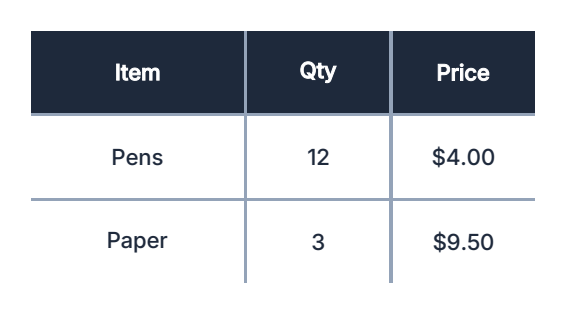
Put the grid in a layout file. size_from_block makes the grid the block's size:
{ "handle": "items", "type": "overlay", "x": 12, "y": 52, "width": 186, "height": 90,
  "content": { "layout": "grid", "size_from_block": true, "ocols": 3, "orows": 10, "gap_y": 0.3,
               "gap_color_y": "#D0D0D0", "ocol_sizes": "4rem 1rem 1.5rem",
               "orow_sizes": "8mm 8mm 8mm 8mm 8mm 8mm 8mm 8mm 8mm 8mm",
               "placements": [] } }
Fill it from a script
After the layout is placed, write the cells with setCells(grid, startIndex, cells)
(slots are 1-based). cell_sizing: "stretch" fills the cell. addBlock into a grid is
refused; use setCells.
overlay("overlay.canvas");
var cells = [];
inputs.rows.forEach(function (row) {
  cells.push({ type: "text", width: 60, height: 6, text: row.name,
               valign: "center", cell_sizing: "stretch" });
  cells.push({ type: "text", width: 30, height: 6, text: "$" + row.price,
               align: "right", valign: "center", cell_sizing: "stretch" });
});
setCells("items", 1, cells);
Cells fill left to right, then down. A grid holds orows x ocols children; any beyond that
are dropped. Only rows that have cells get gap lines, so unused rows stay empty.
getCount("items") is the number of slots now, and getCells("items", 1, 3) reads cells back.
A null cell clears its slot. orderCells, orderOrows and orderOcols
((grid, start, end, direction)) reorder cells or whole lanes by whether they hold data:
"asc" puts those without data first, "desc" packs data to the front.
Fill origin and direction
fill_origin is the corner cell 1 sits in (top_left, top_right, bottom_left,
bottom_right); fill_axis is the way cells flow from it (horizontal or vertical).
orows is the number of lanes and ocols the cells along the flow in each lane. With the
default horizontal fill these are the rows and columns; with a vertical fill they swap.
ocol_sizes and orow_sizes are listed from the fill origin.
A cell can name its own place with orow and ocol (1-based); the layout file reference
lists the other cell keys. There is no column span; nest an overlay grid inside a cell instead.
Shrink and grow
Empty trailing lanes or columns can collapse, and the grid can size itself from its cells:
leave its width and height out and each is the total of its tracks (a track is its
largest cell), plus the gaps and the grid's own frame. Turn on size_from_overlay on the
overlay block and the block follows that size. getBlockBounds and getBlockInfo report the
size a block renders at right now, so a script can place content directly under a contracting
grid. getBlockInfo also returns declared_width / declared_height when they differ from
the authored size.
min_orows,min_ocols- lanes / columns always kept; trailing ones with no data collapse.overflow_orows- extra lanes pastorows, existing only while they hold data.
A cell has data when its has_data is true, or when it holds a visible, non-blank block.
Repeat a template per record
To build one row per entry of a repeating group, set
repeating_group_id and write the placements as a template using {inputs.field}:
"content": { "layout": "grid", "ocols": 2, "orows": 10, "repeating_group_id": "options",
  "placements": [
    { "type": "text", "text": "{inputs.description}", "cell_sizing": "stretch" },
    { "type": "text", "text": "{inputs.price}", "align": "right", "cell_sizing": "stretch" }
  ] }
No script call is needed: when process.js calls overlay() for the file, the template repeats for each
record (using the inputs as they are at that call). To add a totals row after the records, use setCells("items", getCount("items") + 1, [...]). Record N's blocks are addressed by position, e.g. items.N.2 (or by a handle given to the template block).